

Frequently Asked Questions
System Requirements
- Microsoft Windows 64-bit (10 or 11) with the latest Microsoft service packs
- 1 GHz CPU (2 GHz or more recommended)
- 4 GB System Memory (8 GB or more recommended)
- 60 GB available hard disk space
- DirectX 11-compatible Video Card with 2GB Video Memory
- Keyboard
- Mouse or other pointing device
For more information, see Computer Information Made Easy at the bottom of this FAQ.
Important: Later versions of Realtime Landscaping can import designs created in most earlier versions. However, the reverse is not true — designs created using later versions are not compatible with earlier versions. For example, Realtime Landscaping Pro 2025 can open designs created in Pro 2018, but designs created in Pro 2025 cannot be opened in Pro 2018.
Upgrade Options
To upgrade, navigate to the product of your choice and click “Buy Now”. On the purchase page simply click “Options” to choose your upgrade.
Do you own Realtime Landscaping Plus or Pro, and wish to upgrade to a different product?
→ Upgrade from Plus to Pro 2026
→ Upgrade from Pro to Architect 2026
→ Upgrade from Plus to Architect 2026
Do you own an older version of Realtime Landscaping Plus? (2011 through 2025)
→ Upgrade to Plus 2026
→ Upgrade to Pro 2026
Do you own an older version of Realtime Landscaping Pro? (2011 through 2025)
→ Upgrade to Pro 2026
→ Upgrade to Architect 2026
Do you own an older version of Realtime Landscaping Architect? (2011 through 2025)
→ Upgrade to Architect 2026
Are different versions of Realtime Landscaping compatible with each other?
In general, designs created using a later version of the software are not compatible with earlier versions. Specifically:
- Realtime Landscaping Architect can import designs created using the same version of Realtime Landscaping Pro or Plus and most earlier versions of Architect, Pro, and Plus.
- Realtime Landscaping Pro can import designs created using the same version of Realtime Landscaping Plus and most earlier versions of Pro and Plus.
- Realtime Landscaping Plus can import designs created using most earlier versions of Plus.
- Realtime Landscaping Architect cannot import designs created using a later version of Architect, Pro, or Plus.
- Realtime Landscaping Pro cannot import designs created using Realtime Landscaping Architect or a later version of Pro or Plus.
- Realtime Landscaping Plus cannot import designs created using Realtime Landscaping Architect, Pro, or a later version of Plus.
When upgrading, you will receive a download link immediately after your purchase.
Activation Codes
Lost your activation code?
No problem; click here to retrieve it
What is an activation code?
An activation code is simply a code that is needed to activate your software. Here is one example:
12AB-34CD-56EF-78GH-RPR2-JONES
Where can I locate my activation code?
You will see your code immediately after purchasing your software, and you will also receive an e-mail containing your code and purchase receipt.
How many times do I have to enter my activation code?
You only need to enter your code once per install. This means that you will not need enter it again until you decide to either move the software to a different computer or reinstall the software on your current computer.
Why does my software say “activation code expired”?
This is usually due to an outdated computer clock. Try adjusting your Windows clock, and ensure that the date and year are correct. If this does not resolve the problem, you can email support@ideaspectrum.com to request a new activation code. Include your name, address, product, and approximate date of your order.
When I enter my activation code, why doesn’t the Activate button highlight?
This simply means that the code hasn’t been entered correctly; please double check the code. We recommend copying and pasting your activation code to avoid any mistakes. Attempting to use a code for a different product will also cause the Activate button to remain unlit.
Downloading
How long does it take to download?
The download time depends on your internet connection. Fast connections can download the software in 20-30 minutes, while slower connections can take several hours. We have done our best to compress the software as much as possible to make downloading easier, but there is quite a lot of content being transferred!
Why can’t the downloader access the server?
Connection issues are usually due to third party firewalls or anti-virus programs; these programs can block the downloader from accessing the internet. Temporarily disabling any anti-virus programs or firewalls should correct this issue.
Lost your download link?
Contact our Support department to request retrieval. Please include any information that may help us to locate your order.
Will I receive an download link if I purchase an upgrade?
Yes; you will receive a download link for every purchase, including upgrades.
Quantity Discounts
We offer a 20% discount for quantities of 5 or more licenses.
What is the quantity discount for schools?
We offer a 20% discount for quantities of 1-9 licenses, and 30% for quantities of 10 or more licenses.
Please contact us for a quote at Sales@IdeaSpectrum.com, or fax your purchase order to 253-218-4404
Products and Ordering
Absolutely. We use 256 bit SSL security and all transactions are processed through PayPal, one of the largest online payment services in the world. International purchases are processed using FastSpring.
Which product contains the most features?
Realtime Landscaping Architect contains every feature that we offer.
Why is my credit card being declined?
Firstly, if this is happening we are sorry and know how frustrating it can be. In most cases, the card is actually being declined by the bank that issued it; we recommend double-checking your information and contacting your bank if the problem persists.
When can my product be downloaded?
All purchases can be downloaded immediately after making your purchase. We will send you a receipt and download instructions via email.
Language Options
Currently, we only offer English versions of our Realtime Landscaping software. However, our international reseller NBL Software has created a custom version of our software in Spanish. Visit www.landscapedesigner-int.com for details.
What other languages are available?
In addition to Spanish, our international reseller has also created custom versions of our software in Italian, German, French, Greek, Dutch, and Arabic. Visit www.nblsoftware.it for details.
Software Compatibility
Our software runs on Windows 64-bit versions 10 and 11. Earlier versions are not supported. Windows 32-bit is also not supported.
Please note that Windows 10 Mobile can not run full Windows applications like Realtime Landscaping.
Will Realtime Landscaping software run on Windows XP, Vista, 7, or 8?
Earlier versions of Windows are no longer supported due to being discontinued by Microsoft. We are sad to see them go, but continuing to support older operating systems would use time and resources that are better invested in improving the software.
Does Idea Spectrum software run on a Macintosh?
We do not currently have a Macintosh version available. Our software is designed for Windows 64-bit 10 or 11. Virtual Machines (VMs), Parallels, or other emulators are not supported and could result in crashes or other unexpected behavior.
Is my computer compatible with Idea Spectrum software?
If your computer is five years old or newer, then chances are high that it will run Realtime Landscaping software just fine. If you would like to ensure smooth operation before purchasing, simply download the trial version of the product you are interested in. If the trial runs smoothly, then the full version will as well.
Need more information?
Please check the System Requirements at the top of this FAQ. Alternately, download the Realtime Landscaping Architect Free Trial to ensure compatibility on your computer.
Are different versions of Realtime Landscaping compatible with each other?
In general, designs created using a later version of the software are not compatible with earlier versions. Specifically:
- Realtime Landscaping Architect can import designs created using the same version of Realtime Landscaping Pro or Plus and most earlier versions of Architect, Pro, and Plus.
- Realtime Landscaping Pro can import designs created using the same version of Realtime Landscaping Plus and most earlier versions of Pro and Plus.
- Realtime Landscaping Plus can import designs created using most earlier versions of Plus.
- Realtime Landscaping Architect cannot import designs created using a later version of Architect, Pro, or Plus.
- Realtime Landscaping Pro cannot import designs created using a later version of Pro or Plus.
- Realtime Landscaping Plus cannot import designs created using a later version of Plus.
Technical Issues
Any visual glitches that you see are likely caused by wrong or outdated video (GPU) drivers. Updating your video drivers is free, and doing so almost always corrects any visual issues you are experiencing. No clue on where to start? Just e-mail Support@IdeaSpectrum.com with your computer’s model number, and ask for help with your video drivers.
Why does my software exit during long operations?
On some systems, the graphics card does not respond to Windows within the allotted amount of time when it processes complex tasks, so Windows assumes that the task is problematic and closes it. To correct this, we can simply instruct Windows to wait a little more patiently in the future.
The following file can be downloaded and then opened to set the “TdrDelay” to 120 seconds:
Right-click and select “Save Link As” – It is normal for security warnings to appear when making registry changes such as this.
TdrDelay.reg Download
Setting the TdrDelay to 120 seconds will instruct Windows to wait for two minutes before giving up on the graphics card and closing the task that it is working on. This is plenty of time for complex tasks to be completed, and making this change should solve the issue you are experiencing.
Why does my software crash or exit unexpectedly?
In nearly all cases, one of the following suggestions will fix the problem. If you have any questions, please Contact Us for assistance.
- Install the latest update for your software. To do this from Realtime Landscaping, click Help > Check for Updates.
- Install the latest drivers for your video card. Old video drivers can cause issues, especially with advanced 3D software such as Realtime Landscaping.
- Check if you have an AMD video card. If so, the problem may be caused by two third-party applications called Plays.TV and Raptr. A recent update to Plays.TV and Raptr have caused a known issue to occur that affects several different 3D applications, including Realtime Landscaping. Simply uninstall Plays.TV and Raptr to correct the issue. See below for more information.
Plays.TV and Raptr are installed automatically when you install or update your AMD video drivers. These two programs are part of the “Gaming Evolved” bundle, and are not necessary for running Realtime Landscaping. A recent update to Plays.TV and Raptr has caused technical issues with several different 3D applications, including Realtime Landscaping.
To correct the issue, simply uninstall both Plays.tv and Raptr using the Windows Control Panel > Programs and Features.
License Agreements
Your software can be installed on two computers at a time. To transfer the license from one computer to another, simply click “Help” from within your software, and then click “Transfer License”. Click below to read the entire agreement.
Full Legal License Agreement
SOFTWARE LICENSE AGREEMENT
Important: This is a legal agreement between you and Idea Spectrum, Inc. (“Licensor”). The Software that you have downloaded or that you have obtained at retail (“the Software”) is distributed subject to license. If you are obtaining a license on behalf of an organization, you confirm that you have the authority to bind the organization and that the organization will be bound by these terms, and the term “you” shall then refer to you and your organization. Do not use the Software unless and until you have carefully read and agreed to the terms of this Agreement. Installing or using the Software (or authorizing any other person to do so) indicates your acceptance of the terms and conditions contained herein. If you purchased a copy of the Software at retail and you do not agree with these terms, return the Software and accompanying items to the place of purchase within thirty (30) days of purchase and your money will be refunded. This Agreement sets forth the terms and conditions for licensing of the Software from Licensor.
License and Certain Restrictions: You are granted a non-exclusive non-transferable non-sublicensable license to use one copy of the Software in object code format only on one computer or terminal at any one time and to create landscape design images and to display, copy and distribute such landscape design images freely. Although you are encouraged to make a backup copy of the Software for your own use, you are not allowed to make more than two copies for backup purposes. The Software (including, but not limited to, any images, icons, graphics, animations, video, audio, music, help files, and text incorporated into the Software or accompanying the software) is protected by copyright laws. Except as otherwise explicitly permitted herein, you may not disclose or provide copies of the Software to another person, or duplicate the Software by any other means, including electronic transmission. You may not copy the printed materials accompanying the Software, nor print copies of any user documentation for any purpose other than your own personal use. You may not remove, alter or obscure any copyright, trademark or other proprietary rights notice on or in the Software. The Software contains trade secrets, and you may not decompile, reverse engineer, or disassemble the Software. You may not use the Software to operate a service bureau or provide the software as a service. You may not access, copy, assess, disclose, display, or otherwise use the Software for purposes of competitive analysis. You may not modify, adapt, translate, rent, sublicense, assign, lease, loan, resell, distribute, or network the Software, disk, or related materials or create derivative works based upon the Software or any part thereof. Any software that updates, supplements or replaces the original Software is governed by this Agreement unless separate license terms accompany such update, supplement or replacement, in which case such separate terms will govern in the event of a conflict or as otherwise provided in such separate terms. Licensor reserves all rights not explicitly granted to you herein.
Ownership. The Software is owned by Licensor and its licensors and is protected by copyright and other intellectual property laws and treaties. Licensor and its licensors own all right, title and interest in and to the Software, including all copyright and other intellectual property rights in the Software.
Feedback. If you provide Licensor with any feature requests, comments, suggestions or other feedback (“Feedback”), you hereby: (i) agree that such Feedback is provided on a non-proprietary and non-confidential basis, and (ii) grant Licensor a perpetual, non-exclusive, worldwide, fully paid-up, irrevocable license, with the right to sublicense through multiple levels of sublicensees, to incorporate, disclose, and use without limitation the Feedback for any purpose.
Warranty: The sole warranty regarding the Software and related materials is that the original disk is free from physical defects in material and workmanship, assuming proper use, for a period of ninety (90) days from date of purchase. If such defect occurs during this period, you may return your faulty disk to Licensor, along with a dated proof of purchase and Licensor will replace it free of charge. After ninety (90) days, you may obtain a replacement by sending your defective disk and a check for twelve dollars and ninety five cents ($12.95 US) to Licensor. Washington state residents, please add 8.8% sales tax.
Your sole and exclusive remedy for any breach of representation or warranty is that Licensor will refund your payment upon your return of the Software and all related materials, with a copy of your receipt.
EXCEPT FOR THE EXPRESS WARRANTY OF THE ORIGINAL DISKS SET FORTH ABOVE, THIS SOFTWARE AND ANY TECHNICAL SUPPORT IS PROVIDED “AS-IS,” AND TO THE MAXIMUM EXTENT PERMITTED BY APPLICABLE LAW, LICENSOR DISCLAIMS ALL OTHER WARRANTIES, EXPRESS OR IMPLIED, BY STATUTE OR OTHERWISE, REGARDING THE SOFTWARE, DISK, AND RELATED MATERIALS AND SERVICES, INCLUDING THEIR FITNESS FOR A PARTICULAR PURPOSE, THEIR QUALITY, THEIR MERCHANTABILITY, AND NONINFRINGEMENT. WITHOUT LIMITING THE FOREGOING, LICENSOR DOES NOT WARRANT THAT THE SOFTWARE WILL BE FREE OF BUGS, ERRORS, VIRUSES OR ANY OTHER DEFECTS, AND LICENSOR SHALL HAVE NO LIABILITY OF ANY KIND FOR THE USE OF OR INABILITY TO USE THE SOFTWARE; USER GUIDE MISTAKES; INCORRECT OR MISLEADING ADVICE GIVEN BY LICENSOR’S SUPPORT STAFF; ANY LOSS DUE TO PROBLEMS WITH USE OR UNDERSTANDING OF THE SOFTWARE; PROBLEMS OR LIMITATIONS INTRODUCED IN A FUTURE SOFTWARE UPDATE OR PATCH; ANY PROMISES WHETHER DIRECT OR IMPLIED OF ADDING OR FIXING SOFTWARE FEATURES IN A FUTURE UPDATE; OR ANY OTHER PRODUCT OR SERVICE ASSOCIATED THEREWITH EXCEPT FOR THE LIMITED WARRANTY STATED ABOVE. LICENSOR DOES NOT REPRESENT, WARRANT, OR GUARANTEE THE ACCURACY AND TIMELINESS OF THE DATA CONTAINED IN THE SOFTWARE AND LICENSOR SHALL HAVE NO LIABILITY OF ANY KIND WHATSOEVER TO YOU, OR TO ANY OTHER PARTY, ON ACCOUNT OF ANY INACCURACIES IN OR UNTIMELINESS OF THE DATA, OR FOR ANY DELAY IN REPORTING SUCH DATA CONTAINED IN THE SOFTWARE. LICENSOR DOES NOT WARRANT THAT THE OPERATION OF THE SOFTWARE WILL BE UNINTERRUPTED OR ERROR FREE. LICENSOR IS NOT RESPONSIBLE FOR PROBLEMS CAUSED BY ACCIDENT, ABUSE, MISHANDLING, ALTERATION, OR IMPROPER USE. SOME STATES DO NOT ALLOW THE EXCLUSION OF IMPLIED WARRANTIES, SO THE ABOVE EXCLUSIONS MAY NOT APPLY TO YOU. IN THAT EVENT, ANY IMPLIED WARRANTIES ARE LIMITED IN DURATION TO NINETY (90) DAYS FROM THE DATE OF PURCHASE OF THE SOFTWARE. THIS WARRANTY GIVES YOU SPECIFIC LEGAL RIGHTS. YOU MAY HAVE OTHER RIGHTS, WHICH VARY FROM STATE TO STATE.
Certain Limitations: Licensor has no control over your use of the Software. Licensor does not and cannot warrant the performance or results that may be obtained by its use. The Software is for visualization purposes only. It may not be exact or accurate. It is no substitute for professional services. Licensor’s support technicians are not licensed contractors, electricians, landscape design or landscape architect professionals. The Software does not incorporate building codes or ordinances that control placement of utilities, swimming pool fences or other objects or services. Area Calculations should always be verified by actual site measurements. Unilock and Idea Spectrum are not responsible for the accuracy of scale, area or quantity calculations. YOU SHOULD REVIEW ALL APPLICABLE CODES AND ORDINANCES AND YOU RELEASE AND INDEMNIFY LICENSOR AGAINST ANY CLAIMS THAT LICENSOR SHOULD COMPLY OR SHOULD HAVE COMPLIED WITH SAME.
Limitation of Damages: TO THE MAXIMUM EXTENT PERMITTED BY APPLICABLE LAW, LICENSOR AND ITS SUPPLIERS WILL NOT BE LIABLE FOR ANY INDIRECT, SPECIAL, INCIDENTAL, OR CONSEQUENTIAL DAMAGES (INCLUDING, BUT NOT LIMITED TO, DAMAGES FOR LOSS OF BUSINESS, LOSS OF PROFITS, LOSS OF DATA, LOSS OF CONNECTIVITY, LOSS OF LABOR OR OPPORTUNITY, OR THE LIKE), WHETHER BASED ON BREACH OF CONTRACT, TORT (INCLUDING, BUT NOT LIMITED TO, NEGLIGENCE), PRODUCT LIABILITY OR OTHERWISE, EVEN IF LICENSOR OR ITS REPRESENTATIVES HAVE BEEN ADVISED OF THE POSSIBILITY OF SUCH DAMAGES AND EVEN IF A REMEDY SET FORTH HEREIN IS FOUND TO HAVE FAILED OF ITS ESSENTIAL PURPOSE. LICENSOR’S TOTAL LIABILITY TO YOU FOR ANY CAUSE WHATSOEVER WILL BE LIMITED TO THE AMOUNT PAID BY YOU FOR THIS PRODUCT. SOME STATES DO NOT ALLOW THE LIMITATION OF EXCLUSION OF LIABILITY FOR INCIDENTAL OR CONSEQUENTIAL DAMAGES, SO THE ABOVE LIMITATION OR EXCLUSION MAY NOT APPLY TO YOU.
The limitations of damages set forth above are fundamental elements of the basis of the bargain between Licensor and you. Licensor would not be able to provide this product at the price you paid without such limitations.
Force Majeure: Neither party will be responsible for its failure to perform under this Agreement due to causes beyond its reasonable control, including acts of God, fire, theft, war, riot, embargoes, or acts of civil or military authorities (“Force Majeure Event”). Upon the occurrence of any Force Majeure Event that will affect a party’s performance under this Agreement, the affected party shall promptly give notice to the other party.
Equitable Remedies: You acknowledge that if you breach this Agreement, Licensor may have no adequate remedy at law and will suffer irreparable harm as a result of such a breach and will therefore be entitled to equitable remedies, including injunctive relief, without the obligation of posting a bond.
Miscellaneous: You acknowledge that, in providing you with the Software, Licensor has relied upon your agreement to be bound by the terms of this Agreement. You further acknowledge that you have read, understood, and agreed to be bound by the terms of this Agreement, and hereby reaffirm your acceptance of those terms. You further acknowledge that this Agreement constitutes the complete statement of the agreement between you and Licensor, and that it supersedes any prior or contemporaneous promises, representations, or descriptions regarding the Software. This Agreement shall not, however, limit any rights that Licensor may have under trade secret, trademark, copyright, patent, or other laws. The agents, employees, distributors, and dealers of Licensor are not authorized to make modifications to this Agreement, or to make any additional representations, commitments, or warranties binding on Licensor. Accordingly, additional statements such as dealer or other advertising or presentations, whether oral or written, do not constitute representations or warranties by Licensor and they are hereby disclaimed. While free telephone and email technical support are currently provided for current versions of the Software, Licensor shall have the right to initiate time limits on such free support in the future, may decline excessive demands for support, and may begin charging for support in the future. This Agreement may be modified only in writing. If any provision of this Agreement is invalid or unenforceable under applicable law, such provision shall be enforced to the extent enforceable and the remaining provisions will continue in full force and effect, unless the failure to enforce the entire provision would result in denying to either party the basis of the bargain entered into herein, in which case this license shall automatically terminate, you shall be entitled to a full refund and you shall return all copies of the Software and related materials to Licensor. The validity and performance of this Agreement shall be governed by Washington state law (without reference to choice of law principles), except as to those matters governed by federal law. This Agreement is deemed entered into in Pierce County, Washington, and jurisdiction for resolution of any disputes shall reside solely in the state courts located in Pierce County, Washington and federal courts of the Western District of Washington. The parties waive claims of forum non conveniens. In any action or suit to enforce any right or remedy under this Agreement or to interpret any provisions of this Agreement, the prevailing party shall be entitled to recover reasonable attorneys’ fees and costs, including expert witness fees. This Agreement shall be construed as to its fair meaning and not strictly for or against either party.
Computer Information Made Easy
Windows Info (Operating System)
Windows is an operating system that was developed by Microsoft, and serves as an interface to your programs and applications. The versions of Windows that are widely used today are Windows 64-bit version 10 and 11. The 64-bit version of Windows is required — our software will not run on older 32-bit computers.
Windows 64-bit 10/11: Our landscape design software runs on Windows 64-bit 10/11 Desktop. The “Mobile” version of Windows 10 is developed for lighter systems, such as certain tablets, netbooks, and smartphones. Desktop-specific Windows applications such as ours will not run on the Mobile version.
Macintosh: We do not currently have a Macintosh version available. Our software is designed for Windows 64-bit 10 or 11. Virtual Machines (VMs), Parallels, or other emulators are not supported and could result in crashes or other unexpected behavior.
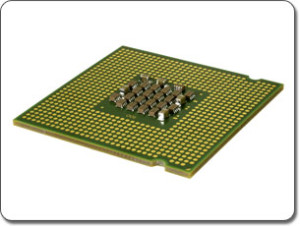
CPU Info (also known as Processor)
The CPU (Central Processing Unit) is the most important part of any computer. The CPU could be referred to as the “core” or “brain” of the computer, but is only about two inches in size. Our software requires a 64-bit computer.
Speed: The speed of the CPU is measured in gigahertz (GHz), which will be clearly expressed in the system’s sales literature. For example, a laptop would be advertized as a “3.2GHz Notebook”. To detect the speed of your CPU, simply open the Control Panel in Windows and open “System”.
Upgrading: The CPUs of both desktop and laptop computers can be upgraded, though it is not common to upgrade laptop CPUs. While upgrading the CPU of desktop computers is a simple and quick process, the actual upgrade should be done by someone with experience due to the delicate nature of the CPU.
Multi-Core: Modern CPUs will often have two or more “cores”. What this means is that there are actually multiple CPUs embedded in one chip, providing you with greater speed when running multiple programs at once. For example, one of the cores could dedicate itself to 3D landscape design software.
RAM Info (also known as Memory)
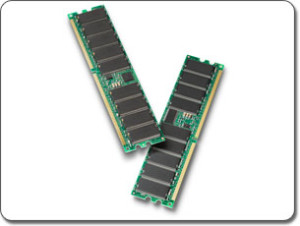
RAM (Random Access Memory), also called “system memory” or just “memory”, is used by the computer to store data for short periods of time. RAM is often confused with the “Hard Drive”, which is considered permanent storage – which is to say the files are not deleted unless you delete them. RAM is sold in thin sticks that are about six inches long.
Speed: The main factor that determines the power of the RAM is the amount of storage the RAM can hold at one time, measured in gigabytes (GB). Having enough amount of RAM is important to the speed of your landscape design software and other programs and applications. To detect the amount of your RAM, simply open the Control Panel in Windows and open “System”.
Upgrading: The RAM is likely the most commonly upgraded component for both desktops and laptops because of its small size, how easy it is to replace, and its low price. When choosing which type of RAM to buy, consult your computer manual for the right speed and type of RAM to purchase. Note that computers running Windows XP will only support up to 4GB of RAM.
GPU Info (also known as Video Card)
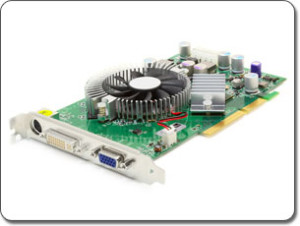
The GPU is the most important component for running modern 3D software, because it is much better at processing 3D images than the CPU. The GPU is either integrated into the motherboard of the computer, or is a removable card as shown in the picture below.
Speed: There are many different factors that affect the speed and power of the GPU, but two of the most tangible factors are the video memory and the supported version of DirectX. Our software requires a GPU that is compatible with DirectX10 or higher. The video memory is very similar to RAM, but is dedicated to GPU tasks such as rendering 3D houses.
Upgrading: The GPU is likely the second most often upgraded component, especially for 3D gamers and CAD professionals. Unfortunately, there is no simple way to upgrade the GPU of a laptop at this time. It is recommended to consult your computer manual to ensure you purchase the correct type of GPU for your system. Please let us know if you would like help in choosing a GPU upgrade.
Upgrading your GPU (hardware)
Because GPUs are so crucial to modern 3D programs, it is beneficial to gain a basic understanding of what to look for in a GPU and how to gauge the actual speed of a GPU.
Gauging the speed of GeForce cards: Most Nvidia GeForce GPUs have three or four numbers that compose the model number. The first number represents the GPU series, and the next number represents the rank of the GPU in that series. For example, a GeForce 8600 is an “8” series, and the “6” is a way to gauge its power. A GeForce 9200 will actually be far less powerful than a GeForce 8800.
Another way of gauging GPU speed: To see a more concrete display of a GPU’s power, it is best to view its “benchmark”. A benchmark is a “score” that is given to GPUs depending on how well they perform. To locate benchmarks for GPUs, just search for “Video Card Benchmarks” and choose the site of your choice (we recommend sites that use “Passmark”). For example, a GeForce 6600 has a benchmark of “147” while a GeForce 8600 has a benchmark of “235”, meaning that the 8600 is much faster. We recommend GPUs with a benchmark of at least “500”.
On most desktop computers, your GPU can be easily upgraded. Depending on your computer type, a reasonably powerful GPU can be purchased for approximately fifty dollars.
Want to locate a new video card yourself?: GPUs can be found at local computer stores, the electronics section of many department stores, and some computer repair shops. However, it has been our experience that the best value in GPUs can be found online. When purchasing a GPU, you will need to know the bus type of your computer (AGP or PCI Express). If purchasing a high powered video card, it pays to be mindful of your computer’s power supply (wattage) and the amount of room inside your computer case. Many video cards come with a return policy and a generous manufacturer’s warranty (such as 3 years or life).
Let us recommend a GPU for you: We would be happy to help you locate a GPU upgrade for your computer. Please send an e-mail to Support@IdeaSpectrum.com with the following information:
- Your computer’s Model Number; this is usually found on the case of your computer.
- Your ideal price range.
- Please mention GPU Upgrade Help in the Subject line of the e-mail.
Updating your GPU drivers (software)
Your video driver (or GPU driver) is a small program that helps your computer’s GPU to communicate with Windows. Video drivers are free, easy to install, and should be updated often. If your video driver is out of date, then 3D software may not appear optimally and may not function at all. You can either download and install your video driver update yourself, or we can assist you in locating it.
Tip: Even if your computer automatically updates other drivers, it is very unlikely that it updates your video driver as well. New computers are sometimes shipped with outdated drivers, so the video driver should be updated even on a new system.
Locate your GPU driver update yourself: Your video driver update can typically be downloaded from the manufacturer of your computer, or from the manufacturer of your video card. Some computer manufacturers include Dell, HP, and Compaq. Some video card manufacturers include Nvidia, ATI, and Intel. To locate the correct update, you will need to know your computer’s model number and/or the model of your video card.
Let us locate your GPU driver update for you: We would be happy to locate your GPU driver update for you. Please follow the instructions below:
- Click the Windows button.
- Type DxDiag, and press the Enter key.
- Click the Save All Information button to save the info to a file on your desktop.
- Send an e-mail to Support@IdeaSpectrum.com with the saved file attached. Please mention GPU Driver Update Help in the Subject line.
Mouse Info
A Mouse is simply one example of a pointing device. Any pointing device that is compatible with Windows will function with our landscape design software.
Pointing Devices: Some examples of pointing devices include laptop touchpads, trackballs, mice, touchscreen monitors, certain joysticks, and even motion-tracking mouse alternatives.
Recommended: While the pointing device you choose is ultimately a matter of personal preference, we highly recommend using a basic 2-button mouse with a mousewheel, similar to the one pictured below. There are several intuitive shortcuts in our landscaping software that make the design process even easier when using a mouse.

Still have questions? Contact us and we will be happy to help!